

The First Map: How the Browser Shapes the World
Every adventure begins with understanding the terrain beneath your feet.
Editor’s Note: This article is an expanded and revised edition of a piece originally published on RandomThoughtsInTraffic.com. For its StackNScroll release, the material has been substantially updated with deeper coverage of browser architecture, rendering behavior, document parsing, resource loading, and the relationship between structure, presentation, and interactivity. New sections have been added to explain the browser’s rendering pipeline, introduce foundational performance concepts, and establish the technical groundwork for future articles in The Full-Stack Campaign. As part of this week’s Foundations of the Realm theme, the goal is to help readers develop accurate mental models of how browsers transform source code into user experiences. The revised edition moves beyond introductory explanations and focuses on the engineering principles that underpin modern frontend development.
Foundations of the Realm
One of the most common mistakes I see newer developers make is assuming that the browser simply displays their work. The assumption seems reasonable because the browser is usually the final thing we see. We write HTML, CSS, and JavaScript, save our files, refresh the page, and observe the results. From that perspective, the browser feels passive, almost like a sheet of parchment receiving instructions from a scribe. The reality is far more interesting. The browser is actively interpreting thousands of decisions on our behalf every time a page loads.
I learned this lesson the hard way during my early years building websites. Like many developers, I spent countless hours staring at layouts that refused to behave as expected. I would adjust CSS, refresh the page, and hope for a different outcome. Sometimes a change appeared to fix the issue. Other times it made the situation worse. Looking back, I realized that my problem was not a lack of effort. My problem was a lack of understanding. I was trying to navigate a kingdom without first learning how its roads, gates, and laws were organized.
Every successful adventuring party eventually studies a map before setting out into the wilderness. The map does not replace experience, but it provides context for every decision that follows. Software development works much the same way. Before adventurers can explore the world, they must understand the rules that shape it. Before engineers can effectively build modern applications, they must understand the environment responsible for bringing those applications to life.
This principle serves as the foundation for both this article and the broader Full-Stack Campaign series. Throughout the coming weeks we will explore the roads, fortresses, treasuries, and infrastructure that support modern software systems. We will discuss frontend architecture, backend services, data management, performance, deployment, and scalability. Every one of those topics ultimately depends upon the foundation established here. The browser is the first territory every web application must cross, making it the ideal place to begin our journey.
The Cartographer’s First Lesson: HTML Is Not the Finished World
Many developers begin learning web development by studying HTML. That is the correct starting point because HTML defines the structure of a document. Problems arise when developers assume that HTML directly creates what users see on the screen. In reality, HTML serves as a description of structure and meaning. The browser reads that description and builds an internal representation before anything becomes visible.
Consider the following document:
</> HTML

<!DOCTYPE html>
<html lang="en">
<head>
    <meta charset="UTF-8">
    <title>Guild Hall</title>
</head>
<body>
    <h1>Welcome to the Guild Hall</h1>
    <p>Every adventurer begins somewhere.</p>
</body>
</html>
When this file reaches the browser, the browser does not immediately display a heading and paragraph. Instead, it begins parsing the document from top to bottom. Every element is converted into an internal structure called the Document Object Model, commonly known as the DOM. The DOM exists entirely within the browser and represents the browser’s understanding of the page.
I often compare the DOM to an architect’s blueprint. Visitors walking through a castle experience hallways, chambers, and towers. Architects see structural relationships, support systems, and dependencies. The browser thinks more like the architect than the visitor. It builds a hierarchy that defines how every element relates to every other element.
The resulting structure resembles something like this:
html
├── head
│   ├── meta
│   └── title
└── body
    ├── h1
    └── p
This distinction matters because nearly every browser feature depends upon the DOM. JavaScript interacts with it. Accessibility tools read it. Search engines analyze it. Rendering systems use it as a foundation. Once developers understand that HTML creates structure rather than appearance, many browser behaviors begin to make more sense.
One lesson I learned while maintaining large business applications was that debugging often becomes easier when you stop looking at the page and start looking at the DOM. What appears wrong visually is frequently the result of a structural issue underneath. Missing elements, unexpected nesting, duplicate identifiers, and malformed markup often reveal themselves quickly when viewed through the browser’s internal representation rather than the rendered page.
The Laws of the Realm: How CSS Governs the Kingdom
After constructing the DOM, the browser begins processing CSS. Many developers treat CSS as a purely visual language, but that perspective dramatically understates its importance. CSS influences not only appearance but also layout, positioning, sizing, inheritance, responsiveness, and interaction behavior.
Consider the following stylesheet:
</> CSS

body {
    font-family: Arial, sans-serif;
    max-width: 900px;
    margin: 0 auto;
}

h1 {
    color: darkslateblue;
}

p {
    line-height: 1.6;
}
These rules affect far more than typography and color. They influence how space is allocated throughout the page and how content flows within that space. The browser must determine which rules apply to which elements, resolve conflicts between competing declarations, and calculate final values before rendering can proceed.
This process explains why CSS sometimes appears mysterious to newer developers. They may write a rule expecting one outcome and receive another. In most cases, the browser is not behaving unpredictably. It is applying specificity, inheritance, and cascade rules exactly as designed. The challenge lies in understanding those rules well enough to predict the result before refreshing the page.
Over the years, I have found it helpful to stop asking why CSS is broken and instead ask which rule won and why it won. That question shifts the conversation from frustration to investigation. Once developers adopt that mindset, CSS becomes significantly easier to reason about.
The Stonemasons Raise the City Walls
Once HTML and CSS have been processed, the browser still has additional work to perform. At this stage, it possesses structural information and styling information, but nothing has been drawn on the screen. Before users can see anything, the browser must combine these systems into something it can render.
To accomplish this, the browser creates a structure known as the render tree. Unlike the DOM, the render tree contains only elements that contribute to visual output. Elements that should not appear on the page may be excluded. Styling information becomes attached to each renderable node, creating a blueprint for what users will eventually see.
After constructing the render tree, the browser begins layout calculations. Every visible element must receive a position and size. Widths, heights, margins, padding, and alignment rules all influence these calculations. For small pages, this process happens almost instantly. For large applications containing thousands of elements, layout calculations can become one of the most expensive operations the browser performs.
This step is where many frontend issues originate. Developers frequently encounter overlapping content, unexpected spacing, or layouts that shift under certain conditions. These problems are rarely random. More often, they are the result of layout calculations producing outcomes the developer did not anticipate. Understanding how the browser approaches layout helps transform these issues from mysteries into solvable problems.
Once layout is complete, the browser paints pixels to the screen. Text appears. Images render. Colors fill backgrounds. The visible kingdom finally emerges from the instructions provided by the developer.
The Watchtowers and Messengers: How JavaScript Moves Through the Kingdom
A kingdom composed entirely of stone walls and roads would be functional, but lifeless. Modern web applications require interaction, communication, and responsiveness. This is where JavaScript enters the realm. While HTML provides structure and CSS governs presentation, JavaScript allows the browser to respond to events, modify content, request information, and coordinate behavior across an application.
One misconception I frequently encounter is the belief that JavaScript operates independently from the browser. In reality, JavaScript running in a webpage depends heavily upon browser-provided capabilities. The language itself provides logic and syntax, but the browser supplies access to the DOM, event systems, networking functionality, storage mechanisms, timers, and numerous APIs. The browser serves as the kingdom’s infrastructure, while JavaScript acts as the messengers, guards, and administrators operating within it.
Consider a simple example:
</> HTML

<button id="questButton">
    Accept Quest
</button>

<p id="questStatus">
    No active quest.
</p>
const button =
document.getElementById("questButton");
const status =
document.getElementById("questStatus");
button.addEventListener("click", () => {
status.textContent =
"Quest accepted.";
});At first glance, this appears straightforward. A user clicks a button and text changes. Behind the scenes, however, the browser coordinates several systems simultaneously. It listens for user interaction, generates an event object, queues work, executes JavaScript, updates the DOM, recalculates affected rendering information, and repaints the necessary portion of the screen. The interaction feels simple because the browser manages an extraordinary amount of complexity on our behalf.
Developers often focus entirely on the JavaScript portion of the equation while overlooking the infrastructure supporting it. Understanding the broader process becomes increasingly valuable as applications grow more sophisticated. Once an application includes asynchronous requests, dynamic content, client-side routing, state management, and real-time updates, browser behavior becomes impossible to ignore.
When the Castle Gates Open: Understanding Timing
Among the most important browser concepts developers must learn is timing. The browser processes documents in a specific order, and many frustrating bugs occur when developers make incorrect assumptions about that order.
I still remember spending hours troubleshooting an issue early in my development career where a script repeatedly failed to find an element that clearly existed on the page. I refreshed the browser, rewrote the code, and questioned my understanding of JavaScript. The problem had nothing to do with JavaScript. The browser simply had not reached the element yet.
Consider the following example:
</> HTML

<script>
const heading =
    document.getElementById("title");

console.log(heading);
</script>

<h1 id="title">
The Guild Hall
</h1>
Many developers expect the heading element to be found successfully. Instead, the result is null. The browser executes the script before it encounters the heading element during parsing. Since the element does not yet exist within the DOM, it cannot be located.
The important lesson here is that the browser is not behaving incorrectly. It is behaving consistently. Once developers understand the sequence being followed, solutions become straightforward. Scripts can be moved below the elements they depend upon, or execution can be delayed until the document has finished loading.
</> JavaScript

document.addEventListener(
    "DOMContentLoaded",
    () => {
        const heading =
            document.getElementById("title");

        console.log(heading);
    }
);
Understanding timing changes how developers approach debugging. Rather than asking why something failed, they begin asking when something happened. That shift often reveals the underlying cause much more quickly.
The Royal Courier Network: The Event Loop
If there is one browser concept that separates intermediate developers from advanced developers, it is understanding the event loop. The event loop is not always visible, but it influences nearly every interactive experience users encounter.
The browser performs many tasks simultaneously. It processes user input, handles network responses, executes JavaScript, manages rendering updates, and coordinates timers. Since JavaScript execution generally occurs on a single main thread, the browser needs a system for determining which tasks should run and when.
I often explain the event loop using a kingdom analogy. Imagine a royal courier network responsible for delivering messages throughout the realm. Requests arrive constantly. Some messages require immediate attention. Others can wait. The courier system ensures that work is processed in an organized manner rather than allowing every messenger to run through the castle at once.
Consider this example:
</> JavaScript

console.log("First");

setTimeout(() => {
    console.log("Second");
}, 0);

console.log("Third");
Many developers initially expect the output to appear in the order written. Instead, the result is:
First
Third
Second
This occurs because the callback provided to setTimeout is placed into a queue. The browser completes the currently executing work before returning to queued tasks. Even a timeout value of zero does not bypass the event loop.
A deep understanding of the event loop becomes increasingly valuable when working with asynchronous operations, APIs, promises, and modern frontend frameworks. Many performance issues and unexpected behaviors become easier to diagnose once developers understand how the browser schedules work. It also helps developers appreciate why seemingly simple user interactions can involve multiple systems working together behind the scenes.
Trade Routes Across the Kingdom
Every webpage represents a collection of resources rather than a single document. When a browser requests a page, it often receives HTML first and then discovers additional assets that must also be retrieved. Stylesheets, scripts, images, fonts, and data requests all contribute to the final experience.
Consider a simple example:
</> HTML

<head>
    <link rel="stylesheet"
          href="styles.css">

    <script src="app.js"></script>
</head>

<body>
    <img src="castle.jpg"
         alt="Castle">
</body>
This document requires multiple requests before the page reaches its final state. The browser must retrieve the stylesheet, JavaScript file, and image while continuing to process the page. Every additional request introduces network costs, making resource management an important aspect of frontend engineering.
One lesson I learned while working on large applications was that performance problems often have surprisingly simple causes. Developers sometimes spend hours optimizing code while overlooking enormous image files, unnecessary requests, or poorly configured caching strategies. Browser performance is not determined solely by algorithms. It is influenced by everything required to deliver and render the experience.
Understanding resource loading helps developers make better architectural decisions. It encourages thoughtful asset management and reinforces the idea that performance begins long before JavaScript execution. The fastest code in the world cannot compensate for resources that arrive late or unnecessarily consume bandwidth.
The Critical Road to the Capital
Before a user sees a fully rendered page, the browser must complete a sequence of work often referred to as the critical rendering path. This path represents the essential steps required to transform source files into visible content.
The browser parses HTML and constructs the DOM. It processes CSS and builds style information. It combines those systems into a render tree, calculates layout, and paints pixels. Only after those tasks are completed does the page become visible to users.
Understanding the critical rendering path helps explain why certain resources affect perceived performance more than others. A large image may consume bandwidth, but a blocking stylesheet can delay rendering entirely. Similarly, JavaScript that interrupts document parsing may delay the browser’s ability to continue building the page.
Developers who understand the critical rendering path gain a stronger intuition for performance optimization. They begin recognizing which resources are essential, which can be deferred, and which create unnecessary delays. This perspective becomes especially valuable as applications grow larger and more complex. Rather than chasing performance improvements blindly, they can focus on the portions of the loading process that have the greatest impact on user experience.
The Master Builders and the Cost of Reconstruction
One of the most valuable lessons developers can learn involves understanding the cost of change. In software architecture, changes often have consequences that extend far beyond the line of code being modified. The browser faces a similar challenge every time the DOM changes after a page has been rendered.
Whenever JavaScript updates content, adds elements, removes nodes, or modifies styles, the browser may need to perform additional work. Depending on what changed, that work can involve recalculating styles, recomputing layouts, rebuilding portions of the render tree, or repainting pixels on the screen. Small updates are usually inexpensive. Large numbers of updates performed repeatedly can become surprisingly costly.
Consider the following example:
</> JavaScript

const panel =
    document.getElementById("panel");

for (let i = 0; i < 100; i++) {
    panel.style.width =
        (panel.offsetWidth + 1) + "px";
}
At first glance, this code appears harmless. The width changes one hundred times and eventually reaches the desired result. The hidden problem is that the browser must repeatedly calculate layout information during each iteration. Every read of offsetWidth may force the browser to stop, evaluate the current layout, and determine the latest dimensions before continuing.
A more efficient approach separates reading from writing:
</> JavaScript

const panel =
    document.getElementById("panel");

let width = panel.offsetWidth;

for (let i = 0; i < 100; i++) {
    width++;
}

panel.style.width =
    width + "px";
The browser now performs significantly less work because it calculates the layout once and applies the final update afterward. The outcome remains the same, but the cost is dramatically reduced. This distinction becomes increasingly important as applications scale. An inefficiency that goes unnoticed on a simple page can become a meaningful performance issue inside a complex enterprise application.
I often compare this process to rebuilding roads throughout a kingdom. Repairing a single road occasionally is manageable. Rebuilding every major road after every small change quickly becomes expensive. The browser faces similar challenges when layout calculations are triggered unnecessarily. Developers who understand this principle stop optimizing blindly and begin optimizing the operations that actually matter.
The Ancient Tongue of the Builders
Understanding browser behavior also helps explain why semantic HTML remains one of the most important skills in frontend development. Modern frameworks have introduced many abstractions, but browsers, accessibility tools, and search engines still rely heavily upon semantic meaning.
Consider these two examples:
</> HTML

<div class="navigation">
    <a href="/">Home</a>
</div>
<nav>
<a href="/">Home</a>
</nav>To many users, these examples appear identical. To the browser and other technologies, they communicate very different levels of information. The second example explicitly identifies the purpose of the content. The browser immediately understands that this section represents navigation rather than generic page structure.
Semantic HTML provides context. It tells browsers what content means rather than merely describing how content should appear. That distinction improves accessibility, supports assistive technologies, and creates documents that are easier to maintain over time. It also establishes a stronger foundation for the systems layered on top of the browser.
This topic becomes particularly important because Wednesday’s article, The Bones of the Realm: Writing Semantic HTML That Holds, explores semantic structure in much greater detail. That discussion builds directly upon the concepts introduced here. Once developers understand how browsers interpret structure, they begin to appreciate why semantic decisions have consequences far beyond visual presentation.
The browser is constantly asking what something represents. Semantic HTML gives it an answer.
The Guild Master’s Instruments
As developers mature, one habit becomes increasingly valuable: observation. Many engineers spend years treating developer tools as emergency equipment rather than everyday instruments. They open the tools only when something breaks and close them as soon as the problem disappears. Experienced developers tend to approach these tools very differently.
Early in my career, I treated browser developer tools as something I opened after a problem appeared. Eventually I realized they were far more valuable before a problem appeared. Understanding how to inspect requests, examine the DOM, observe rendering behavior, and monitor performance often reveals issues long before they become production bugs. The browser is constantly providing information. The challenge is learning how to interpret it.
I often describe browser developer tools as the instruments carried by a master cartographer. A map becomes more useful when accompanied by a compass, measuring tools, and a method for recording observations. Browser tools serve a similar purpose. They reveal how the browser understands the application rather than how the developer hopes it behaves.
The Elements panel exposes the structure of the DOM. The Network panel reveals resource requests and loading behavior. The Performance panel identifies expensive operations. The Console provides insight into execution flow and runtime behavior. Together, these tools create a window into the browser’s internal state.
One of the most important transitions in a developer’s career occurs when they stop guessing and start observing. Instead of repeatedly changing code and hoping for a different result, they gather evidence. They inspect the DOM. They examine network requests. They analyze rendering behavior. They form conclusions based on data rather than assumptions.
The strongest engineers I have worked alongside were not necessarily the ones who memorized the most syntax. They were the individuals who understood how to investigate systems methodically. The browser provides an enormous amount of information. Learning how to interpret that information is one of the most practical skills an engineer can develop.
Why Wise Lords Build Foundations First
One reason I chose to begin The Full-Stack Campaign with the browser is that modern development often encourages engineers to build towers before understanding foundations. New developers frequently learn frameworks, libraries, and abstractions before they fully understand the platform those technologies depend upon.
Frameworks are valuable. They solve real problems and accelerate development. The challenge appears when developers understand the framework but not the environment in which the framework operates. When unexpected behavior occurs, they possess fewer tools for diagnosing the problem because they never developed a mental model of the underlying platform.
Every major frontend framework ultimately depends upon browser behavior. Components become DOM elements. Styling systems generate CSS. State updates trigger rendering changes. Routing systems operate within browser navigation mechanisms. Regardless of how sophisticated the abstraction becomes, the browser remains responsible for interpreting and executing the final result.
This is why browser knowledge creates leverage across an entire career. The lessons learned here remain useful whether a developer works with React, Vue, Angular, Svelte, or technologies that have not yet been invented. Foundations endure long after specific tools evolve.
Beyond the Capital Walls
The browser represents only the first stage of our journey. Beyond it lie application servers, APIs, databases, authentication systems, deployment pipelines, monitoring tools, and infrastructure concerns that collectively support modern software. These topics may seem far removed from browser behavior, but they are connected more closely than many developers realize.
Every backend service ultimately exists to provide information that a browser will consume. Every API response is shaped by the needs of a user interface. Every optimization strategy seeks to improve the experience delivered through the browser. Understanding the destination helps developers design better systems throughout the stack.
As this series progresses, we will move deeper into the kingdom. We will explore the structures that support modern applications, the decisions that influence scalability, and the architectural patterns that help systems remain maintainable over time. We will travel the roads connecting interfaces to services, examine the treasuries where information is stored, and study the fortifications that protect modern systems. Each new topic will build upon the foundation established here because every kingdom depends upon stable ground beneath its walls.
The browser is not the entire realm, but it is the gateway through which every traveler enters.
The Cartographer’s Final Counsel
Every successful expedition begins with an understanding of the terrain. Experienced adventurers know that maps reduce uncertainty, reveal opportunities, and prevent costly mistakes. Software development follows the same principle. Before we can navigate the broader landscape of full stack engineering, we must understand the environment where our applications come to life.
The browser is not simply displaying content. It is parsing documents, constructing structures, applying rules, calculating layouts, managing resources, coordinating events, executing scripts, and rendering experiences. Every webpage represents the result of countless browser decisions occurring in fractions of a second. The more accurately we understand those decisions, the more effectively we can build, debug, optimize, and maintain the systems entrusted to us.
Every great campaign begins with a map. In software development, the browser is that map. Engineers who understand it travel farther, solve problems faster, and build stronger systems than those who wander without it. The lessons contained within the browser extend far beyond frontend development because they shape the foundation upon which every web application is built.
Foundations are rarely the most visible part of a kingdom once the walls, towers, and roads have been completed. Yet every structure depends upon them. This week’s Foundations of the Realm theme centers on exactly that idea. The browser may not always receive the attention given to frameworks and architecture, but understanding it provides the stable ground upon which every future lesson in this campaign will stand.
Throughout this campaign, we will continue moving outward from these foundations into the larger realm of software architecture and engineering. We will explore the roads connecting systems, the fortifications that protect them, the treasuries that store their data, and the infrastructure that allows entire kingdoms to function at scale. Every lesson ahead depends upon the knowledge established here.
The browser is the first map.
Understanding it is the first step toward mastering the world beyond it.
If the browser is the world, semantic HTML provides the bones that give that world structure. Before layouts can be refined, interactions can be added, or applications can grow, the underlying document must be built upon a strong foundation.
Next in The Full-Stack Campaign: The Bones of the Realm: Writing Semantic HTML That Holds, where we will examine how meaningful structure creates stronger foundations for accessibility, maintainability, and long-term growth.


You May Also Like

The Gate Beyond the UI: What a Server Actually Does
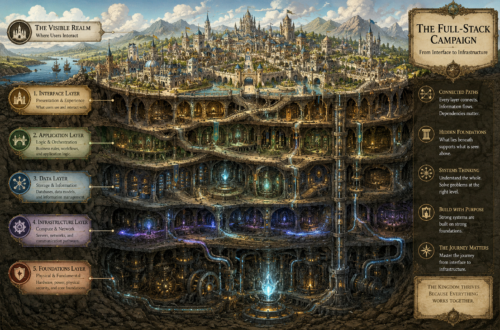
From Interface to Infrastructure